

If your fountain pen skips when you write fast, the cause is usually one of four things: low ink flow, a nib issue, paper, or writing angle. In many cases, I can narrow it down in a few minutes by checking the feed, looking at the tines, trying a different paper, and easing up on pressure.
Here’s the short version:
- If the line fades mid-stroke, the feed may not be supplying ink fast enough.
- If skips happen in one direction, the tines may be tight or slightly out of line.
- If the problem shows up on one notebook only, the paper is likely the cause.
- If the pen works better when I rotate it less or press lighter, my grip or angle is part of the issue.
A simple order helps:
- Flush and refill the pen
- Prime the feed and check for bubbles
- Inspect the nib under bright light
- Test on three papers
- Adjust angle and pressure
Most cases can be fixed at home, and this order cuts out guesswork. The goal is simple: find out whether the pen is running dry, losing contact with the page, or reacting badly to paper or technique.
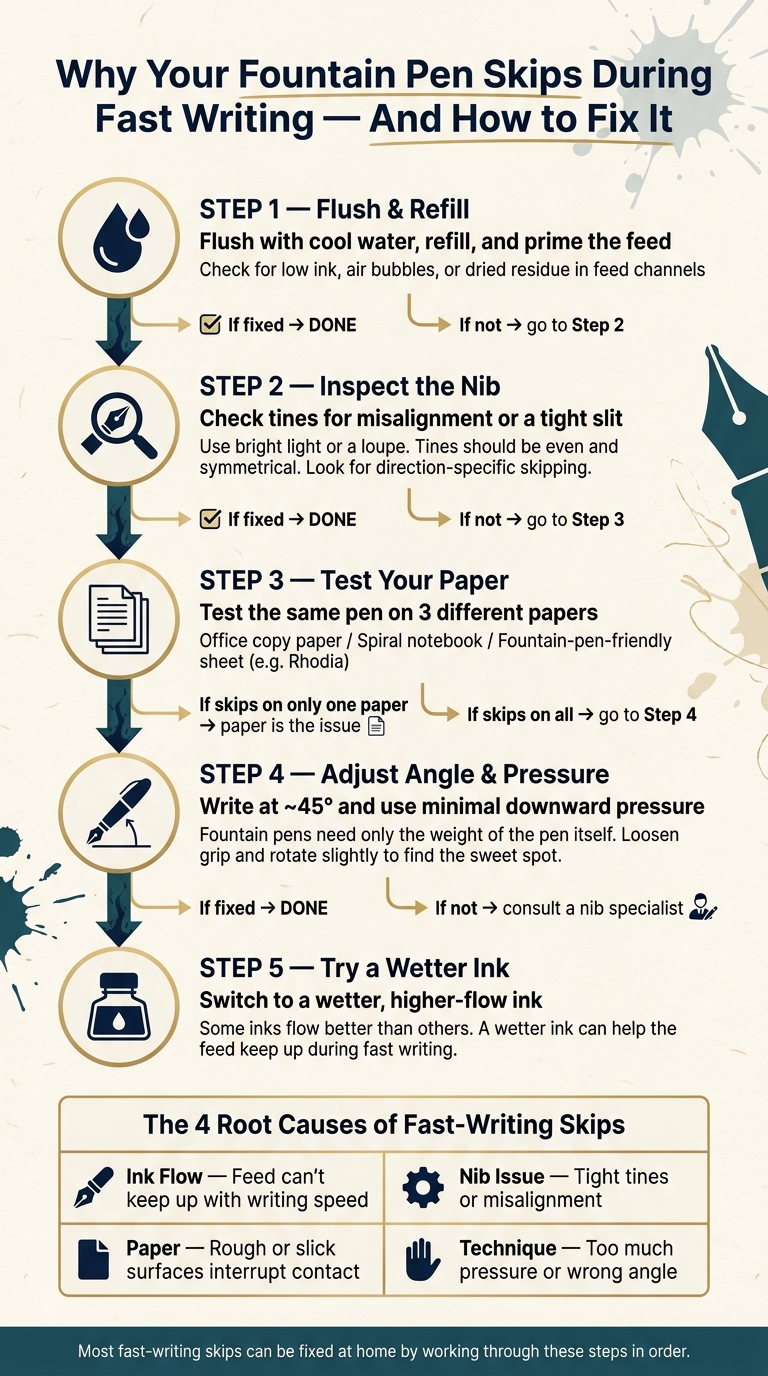
How to Fix Fountain Pen Skipping: 5-Step Troubleshooting Guide
Fountain Pen Skipping Issues Resolved | Easy Fixes That Actually Work
sbb-itb-1dd4fe9
Check ink flow first: dry ink, clogs, and feed starvation
Fast-writing skips often come down to one simple issue: the feed can't move ink to the nib fast enough. The feed sits under the nib and pulls ink from the reservoir to the tip through tiny channels. When those channels don't refill fast enough, your line can fade or break in the middle of quick strokes.
A few common things can slow that flow. Dried ink can tighten those channels. Shimmer particles and leftover residue can build up over time. A low ink level can also cause trouble, and so can trapped air bubbles that interrupt the ink path.
Signs the feed cannot keep up with your writing pace
The most obvious clue is a pen that starts out fine, then gets faint or skips as you keep writing. Slow print may look normal, but fast cursive, long signatures, or quick note-taking start to show gaps. That's a big tell.
Another sign: the pen works a little better right after you gently prime the feed or let it sit for a minute, then the skipping comes back once you write at speed again. That usually points to an ink-flow problem, not nib alignment.
Simple home fixes for a dry-writing pen
Start with the basics. Check the ink supply and look for a low fill level or air bubbles in the cartridge or converter. If the pen is running low, refill it. If you're using a converter, a small twist can push ink into the feed and sometimes clear a stuck bubble.
If that doesn't do the trick, flush the pen with cool water until the water runs clear. For tougher clogs, soak the nib and section in cool water first, then flush again. After that, refill the pen and test it with fast writing, not just a few slow lines.
If the pen still writes dry after cleaning, the ink may be the problem. Some inks simply flow better than others. Switching to a wetter ink can help the pen keep up during fast writing. If cleaning and a wetter ink still don't fix it, move on and inspect the nib for common issues.
Inspect the nib: tight tines and misalignment
If cleaning the pen and switching to a wetter ink like Diamine Writer's Blood didn't stop the skipping, the nib is the next place to look. Fast writing tends to bring nib issues to the surface because the pen has less time to refill the tip between strokes.
A fountain pen nib has a narrow slit that runs from the breather hole down to the tip. The two metal halves on each side of that slit are the tines. Ink moves through that gap and onto the page. If the slit is too tight, ink can't move fast enough during quick strokes. If one tine sits a bit higher or lower than the other, the nib won't meet the paper evenly. That's when you start seeing random gaps, often when your stroke changes direction mid-line.
How to spot a tine problem at home
Start with bright light and a close look at the nib. View the tip straight on. Both tines should meet evenly and look symmetrical. If one side appears higher, tilted, or slightly farther forward, the nib is misaligned.
Then try the daylight test. With the nib dry, look through the slit from above toward a light source. You should see a hair-thin line of light that gets narrower near the tip. If the slit shuts completely at the tip, the tines may be too tight. A loupe or magnifier helps a lot here.
One more clue is direction-specific skipping. On smooth paper, write fast rows of:
- Downstrokes
- Upstrokes
- Side-to-side strokes
If the pen skips only in certain directions, quick upstrokes and diagonal pulls are often where it shows up, that usually points to tine misalignment or rough tipping. When skipping changes based on stroke direction, misalignment or rough tipping is a strong suspect.
Safe first steps before any nib adjustment
Before you touch the tines, try one gentle step first: floss the slit with a thin brass shim to clear out dried ink, then rinse the nib and test again.
Thinking about adjusting tine alignment yourself? Practice first on a cheap steel nib or a spare nib unit. If you're dealing with an expensive gold nib or a nib with a visible bend, it's smarter to hand that off to a nib specialist.
If the nib looks fine, move on to the paper and your writing angle next.
Test your paper and writing technique together
If ink flow looks fine and the nib size and alignment seem fine, the next things to check are paper and how you hold the pen. At that point, those are usually the main variables left.
Paper tests that separate pen issues from notebook issues
Paper can change everything. Rough paper may interrupt contact, while slick paper can make the nib skate and skip.
A simple way to test this is to use the same pen and same ink on three surfaces:
- office copy paper
- a standard spiral notebook page
- a fountain-pen-friendly sheet such as Rhodia or HP Premium
Write the same sentence once at your normal pace and once as fast as you can write comfortably. If the pen skips on only one surface, the paper is probably the issue. If it skips on all three, the cause is more likely the pen, nib, ink, or your writing technique.
If the pen still skips on good paper, the problem is often your angle or pressure.
Small angle and grip changes that improve ink flow
Fountain pens usually work best at a fairly narrow writing angle, so even a slight twist can throw things off. A small rotation in your hand can move the nib away from its sweet spot and lead to skipping.
Start at about 45 degrees to the paper. Then make small adjustments up or down while writing the same short phrase at speed. If the skipping gets better at one angle, stick with it.
Pressure matters too. People who grew up using ballpoints often press much harder than a fountain pen needs. But fountain pens are meant to write with very little downward force, often just the weight of the pen itself. Press too hard, and you can shift the nib against the page in a way that causes skipping.
If the pen suddenly behaves better when you loosen your grip and stop pressing, that’s a strong sign your technique is part of the problem.
Conclusion: A simple order for fixing fast-writing skips
Fast-writing skips usually come down to four things: ink flow, nib alignment, paper, or technique. The easiest way to sort it out is to check them in a simple order.
- Flush with cool water, refill, and prime the feed. If that doesn’t fix it, move to the nib.
- Check for uneven tines or a tight slit under good light. If the nib seems fine, test the paper.
- Test the pen on several papers to isolate the notebook. If paper isn’t the problem, look at how you’re holding the pen.
- Use less pressure and fine-tune the angle. Rotate the pen a bit and hold it at about 45° to the page. If the lines turn solid, your technique was the missing piece.
Most fast-writing skips can be fixed at home if you work through the steps in that order.
FAQs
Why does my fountain pen skip sometimes?
Fountain pens may skip on and off when dried ink, paper fibers, or other debris in the feed or nib gets in the way of ink flow. If the tines are slightly out of line, the pen can also skip in certain stroke directions.
It can also happen when your writing angle or pressure interrupts the flow. In some cases, air leaks or ink getting stuck in the converter can starve the nib of ink.
Can the wrong ink cause skipping at higher speed?
Yes. The wrong ink can cause skipping, especially when you write fast.
Some inks have higher viscosity or higher surface tension, which means they move through the pen more slowly. That slow flow can lead to feed starvation, where the nib isn't getting enough ink to keep up.
Heavily saturated inks can also be part of the problem. The same goes for shimmering and sheening inks. These formulas can clog the feed’s tiny channels and choke off ink flow.
If your pen starts skipping, try a wetter, freer-flowing ink first before you make any mechanical changes.
When should I stop troubleshooting and seek nib repair?
Seek professional nib repair if cleaning, flushing, and basic troubleshooting don’t stop persistent skipping.
You should also get help if you spot serious physical damage. That includes splayed tines, dents, burrs, a sprung nib, an over-polished “valley” between the tines, or internal mechanical problems like a broken piston or vacuum system.
If you’re not sure what you’re looking at, it’s usually smarter to let a professional handle it than to risk making the problem worse with DIY adjustments.