

If your fountain pen feels scratchy, don’t smooth the nib first. In most cases, I’d check 5 things before using any abrasive: tine alignment, paper, ink flow, tipping, and writing angle.
A scratchy nib often has a simple cause. In many cases, the problem is rough paper, dry flow, or pen rotation, not a bad nib. And that matters, because smoothing removes tipping material for good. Once it’s gone, it’s gone.
Here’s the short version:
- Scratchy in one direction? I’d suspect tine misalignment or rotation
- Smooth on good paper but rough on cheap paper? It’s likely paper fibers or paper texture
- Rough at first, then better after a few strokes? That points to dry flow or dried ink
- Rough on every paper with every ink? The issue may be rough tipping
- Better after changing grip or angle? The nib may be fine
About 40°–55° is often the smoothest writing angle for many nibs, and a 10x–20x loupe is enough for most checks. I’d also keep in mind that EF and F nibs often feel sharper than broader nibs because they touch less of the page.
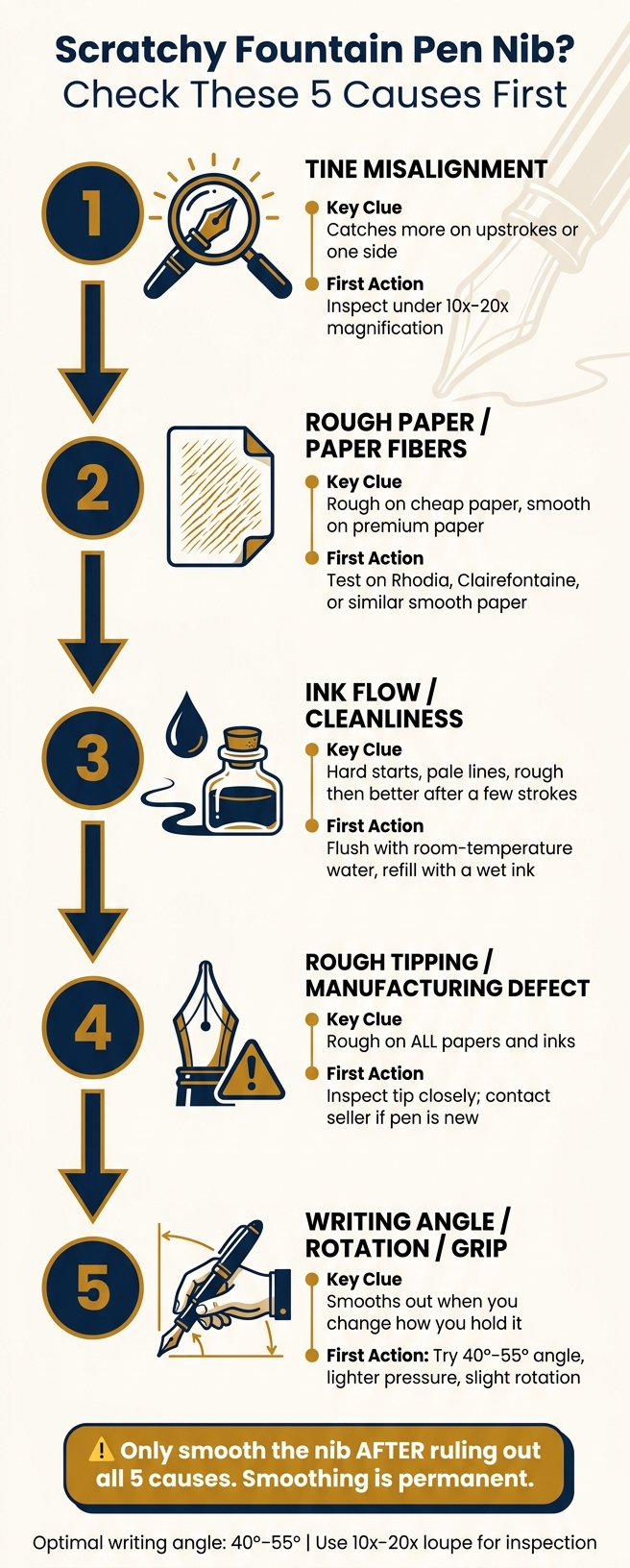
Scratchy Fountain Pen Nib? Check These 5 Causes First
How to smooth a scratchy fountain pen nib
sbb-itb-1dd4fe9
Quick Comparison
| Cause | Main clue | What I’d do first |
|---|---|---|
| Tine misalignment | Catches more on upstrokes or one side | Inspect under magnification |
| Paper fibers / rough paper | Feels bad on cheap paper, better on smooth paper | Test Rhodia, Clairefontaine, or other smooth paper |
| Ink flow / cleanliness | Hard starts, pale lines, skipping | Flush with room-temp water and retest |
| Rough tipping | Rough on all papers and inks | Inspect tip closely; contact seller if new |
| Writing angle / rotation / grip | Smooths out when I change how I hold it | Lower pressure and adjust angle/rotation |
Bottom line: I’d rule out the easy fixes first, then inspect the nib. For more help, check out these common nib issues and quick fixes. That order keeps the risk low and helps you avoid damaging a nib that didn’t need smoothing in the first place.
Check the Cause Before You Start Smoothing
Start by checking the cause. A scratchy feel doesn't always mean the nib is bad. Paper, ink flow, tine alignment, and even the way you hold the pen can all create that same feeling.
Go through the checks in this order: paper, cleaning, handling, then nib inspection.
Smoothing a nib is permanent. Abrasive work removes iridium tipping material, and once that material is gone, you can't put it back. Smooth a nib when it doesn't need it, and you may round the tipping too much. That can lead to skipping.
Before you use any abrasive, check these causes first:
- Test on better paper first - Write on smooth fountain-pen paper. If the scratchiness gets better, the paper is the problem, not the nib.
- Clean the pen - Flush the nib and feed with a fountain pen cleaning solution with room-temperature water until it runs clear. Then refill with a reliable, medium-flow ink.
- Adjust your grip and angle - Use a lighter touch at about 45–60 degrees. Rotate the pen a little and see where it feels smoothest.
- Inspect under magnification - Use a 10x–20x jeweler's loupe or a phone macro lens. Check for paper fibers, dried ink, or visible tine misalignment.
- Evaluate what you're actually feeling - If the nib glides cleanly, you may be feeling normal feedback, not a defect.
Only move to smoothing if the nib still feels scratchy after all of these checks.
1. Tine Misalignment
If changing the paper, ink, and grip didn’t solve the issue, check the tines first. Tine misalignment means one tine sits a bit higher, lower, or off-center, so its edge touches the paper before the tipping does.
The big clue is scratchiness that shows up only in certain stroke directions. It often catches more on upstrokes or diagonal strokes. If that scratchy feel stays the same even on good paper with good ink, tine misalignment is a strong suspect.
Use 10x–20x magnification and look for one tine sitting higher or off-center. Smoothing won’t fix misalignment. Abrasives can round off the sharp edge of the higher tine, but they don’t correct the geometry underneath.
If you can see bending in the tines, or the issue doesn’t get better after a gentle adjustment, contact the seller or manufacturer if the pen is new. If the tines look even, move on to paper fibers and rough paper.
2. Paper Fibers and Rough Paper
Sometimes the nib isn’t the problem at all. The paper is. Rough, fibrous sheets create extra drag and can snag the nib tip, so even a good nib can feel raspy. That’s why paper is the first thing to rule out before you touch the nib. The fastest check is simple: try a smoother sheet.
The biggest tell is scratchiness that changes with the paper. If your pen glides on a good sheet but feels rough on cheap copy paper or a low-cost spiral notebook, the paper is the likely cause, not the nib. You may also notice it during longer writing sessions. The pen starts out fine, then feels scratchier after a few pages as fibers build up on the tip.
Try writing on a smoother, fountain-pen-friendly paper. Rhodia and Clairefontaine are both known for a smoother feel and less fiber shedding than standard 20 lb copy paper. If the rough feel mostly goes away, you’ve found the issue.
You can also check the nib under a bright light. If you see fuzz, tiny white specks, or residue on the tip, that points to fiber buildup.
Wipe off any visible fibers with a soft, lint-free cloth. If the pen feels smooth after that, leave it alone. If not, the next thing to check is ink flow or residue.
Don’t try to smooth the nib for this. That won’t fix rough paper, and it can make things worse. If the nib already writes well on decent paper, using micromesh or other abrasives to force it to work on rough stock can remove tipping material for good. That can leave the nib sharper than before or uneven on other papers. If smooth paper still feels rough, move on to ink flow and cleanliness.
3. Ink Flow and Cleanliness Issues
After you rule out paper, check ink flow. A dry or clogged nib can feel like a rough tip, but the fix isn’t the same. When ink flow is tight, the nib gets less lubrication, and that can make the pen feel scratchy even if the tines are lined up.
The clearest clue is scratchiness that fades after a few strokes. If the pen feels rough on the first line or two and then starts writing more smoothly, it may just be running dry at the start. You may also see pale, thin lines, skipping, or hard starts after the pen has been sitting unused for a few minutes. Those signs usually point to restricted ink delivery, not nib damage.
Remove the cartridge or converter, then flush the nib and feed under a gentle stream of cool water for 15–30 seconds, until the water runs clear. If you’re using a converter, draw water in and push it back out through the nib 3–6 times. Dried ink in the feed, manufacturing oils in a new pen, or residue from heavily saturated ink can all choke flow without leaving obvious marks on the outside.
After cleaning, refill the pen with a wet ink and test it on smooth paper. If it writes better after cleaning, the issue was flow, not nib damage. If it still feels rough across inks, the nib tip is the more likely cause. And if cleaning changes nothing, inspect the nib tip under magnification.
4. Rough Tipping or Manufacturing Defects
If your pen still feels scratchy after you’ve ruled out the paper, cleaned the nib, and checked alignment, the problem may be the tipping itself. The tipping is the small hard alloy point at the end of the nib that touches the paper. If it was ground unevenly at the factory, the pen can feel gritty and drag across the page.
If the scratchiness shows up even on smooth paper and with more than one ink, rough tipping becomes a stronger possibility. Once the nib is clean and dry, take a close look at the tip.
Check for a few things:
- Look straight at the nib to see whether the tip sits centered and even, not off to one side or oddly lopsided.
- Look from the side for sharp edges, burrs, or a curve that doesn’t look even.
- Pay attention to stroke direction. If the nib snags more in one direction than another, one side of the tipping may be hitting the paper more than it should.
If the tip looks damaged or malformed, don’t try to smooth it yourself. Take clear photos and ask for a replacement or warranty help instead. If the tip looks clean and even, the scratchy feel is more likely coming from your writing angle, nib rotation, or fountain pen grip.
5. Writing Angle, Rotation, and Grip
If the tip looks fine under magnification, the next thing to check is how you’re holding the pen. Even a well-tuned nib can feel scratchy when it’s writing off its sweet spot. In many cases, this is a setup problem, not a nib defect. The good news: angle, rotation, and grip are all easy to change before you touch any smoothing material.
A nib has a small polished contact point, and it usually writes best at about 40–55 degrees. Hold it too upright, and the edges can scrape. Hold it too flat, and the underside can drag across the page.
Rotation matters just as much. If the pen twists a little in your fingers, the nib starts riding on one side of the tipping instead of the center. When the scratchiness shows up in only one direction, rotation is often the cause.
Pressure matters too. Grip the pen too hard, and you push the nib into the paper. That makes every tiny rough spot feel worse. If the pen feels smoother when you loosen your fingers, the issue was your grip, not the nib.
Try your normal grip first. Then make small changes:
- Adjust the angle a bit
- Ease up on pressure
- Rotate the pen slightly until the nib tracks straight with your stroke
If the pen smooths out, skip abrasives. Don’t smooth a nib that only needs a small grip or angle fix.
If none of these changes help, move to the diagnostic checklist before doing any abrasive work.
Diagnostic Checklist Before You Reach for Micromesh
Before you do anything abrasive, run through a few simple checks first. Start with the easy stuff, then work toward the nib itself. That one habit can save you a lot of grief.
- Test on smooth paper first. Write on smooth paper in every direction. If the scratchiness goes away, the paper is the issue.
- Check ink flow. Write continuous loops. Skipping, hard starts, or pale lines usually point to flow trouble.
- Flush with room-temperature water. Flush until the water runs clear, then let the pen dry all the way.
- Inspect for fibers or dried ink. Look under good light with a 10× loupe. Rinse the nib - don’t scrape it.
- Check tine alignment under magnification. Both tines should meet evenly, with no step or twist.
- Test writing angle and rotation. Try a 40°–55° angle, slight rotation, and lighter pressure. If that smooths things out, stop there.
Know when to stop entirely. If the nib is vintage, expensive, cracked, or bent, don’t push your luck. Get help instead. Contact the manufacturer for warranty service if the pen is new, or find a professional nibmeister for anything vintage or badly damaged.
Use the reference tables below to match the symptom before you reach for micromesh.
Paper Types and Nib Defect Reference Tables
Paper can make a perfectly good nib feel scratchy. So before you blame the fountain pen nib, test it on smooth fountain-pen paper.
Here’s the big idea: rough paper can create drag, pull fibers onto the tip, and make a pen feel worse than it is.
| Paper Type | Surface Feel | Feathering | Bleed-Through | Fiber Buildup Risk |
|---|---|---|---|---|
| Standard copy paper | Moderate feedback | Common with wet inks | Frequent | Moderate |
| Recycled or low-quality paper | Textured, draggy | Heavy | Heavy | High |
| General notebook paper (mass-market) | Slightly rough to moderate | Moderate | Moderate | Moderate to high |
| Smooth fountain-pen-friendly paper | Smooth to glassy | Rare | Rare | Low |
| Specialty fountain-pen paper (Rhodia, Clairefontaine, Tomoe River) | Smooth with controlled feedback | Minimal to none | Minimal | Very low |
Heavily sized fountain-pen papers shed fewer fibers and usually feel smoother than standard copy paper.
If smooth paper doesn’t change the feel, use the symptom table below to narrow down the cause. At that point, stop thinking about surface texture alone and look at the pattern of the scratchiness instead.
| Symptom | Likely Cause | Severity | Recommended Action |
|---|---|---|---|
| Slight resistance on textured paper, smooth on premium paper | Paper surface / normal feedback | Minor | Switch to smoother paper; no nib work needed |
| Scratchiness that builds during a session, fibers visible on tip | Fiber buildup from paper | Minor | Clean nib, remove fibers, and retest on better paper |
| Consistent scratchiness on all papers, worse on upstrokes | Tine misalignment | Moderate | Inspect under a loupe; beginners should seek warranty service or a nib specialist |
| Sharp catching or digging, uneven tipping | Rough tipping or manufacturing defect | Moderate to serious | Contact the manufacturer for warranty service; do not attempt DIY smoothing |
| Visible crack, bent tip, or ink instability alongside scratchiness | Structural nib damage | Serious | Seek professional repair or replace the nib |
| Scratchiness after over-smoothing | Over-smoothed or damaged tipping | Serious | Professional retipping or nib replacement; further home work is unlikely to help |
One clue matters a lot here: directional catching on good paper points to a nib issue, not the paper.
When to Fix It Yourself and When to Get Help
If the checklist still points to the nib, this section helps you decide whether to handle it yourself or pass it to a pro.
DIY smoothing removes tipping material for good. So use it ONLY on a clean, aligned nib that feels consistently toothy. And if the pen is new and still under warranty, leave it alone.
If the nib is damaged, stop here. When you can see bent tines, a crack near the breather hole, or deep catching that tears paper, you're not dealing with a smoothing issue. You're dealing with a structural problem, and micromesh can make it worse. The same goes for flex nibs, vintage pens, or any pen with sentimental or high dollar value. In those cases, the chance of permanent damage just isn't worth it.
In the U.S., professional nib tuning usually costs $20–$60 per nib, plus shipping. More complex work costs more and can take weeks or even months.
For new pens with clear defects, contact the retailer first, then the manufacturer. Have photos ready, include writing samples on at least two paper types, and give a clear note on what you've already tried. Do not modify the nib before reaching out. It can complicate a warranty claim and may void coverage.
Conclusion
Most scratchy nibs come back to five fixable causes: tine misalignment, rough paper, poor ink flow, rough tipping, or the way you hold and angle the pen. Check them in that order before you smooth anything.
That sequence - paper, cleaning, handling, then nib condition - keeps troubleshooting fast and low-risk. If the scratchiness goes away on better paper, after cleaning, or when you change your grip, that’s where the fix is. Not in smoothing.
As JetPens notes, polish only after confirming the tines are aligned; polishing a misaligned nib can make the problem worse.
Because smoothing is permanent, treat it as the last step, not the first move. Rule out every other cause first. Smooth only when the nib itself is the issue.
FAQs
How can I tell feedback from real scratchiness?
Feedback feels like a normal pencil-on-paper sensation. It stays even in every direction and doesn’t catch on the page. Scratchiness is harsher. The nib drags, trips, or snags as you write.
Try the pen on smooth, high-quality paper. If the rough feel disappears, you’re probably dealing with normal feedback from the paper’s texture, not a nib defect.
Can a scratchy nib damage paper or the nib itself?
Yes. A scratchy nib can catch on paper fibers, which may tear the page or leave stray marks.
If the cause is misaligned tines, using the pen that way can wear down or damage the tipping material. And if you press harder to push through the scratchiness, you can bend or split the tines.
If you feel the nib catching or snagging, stop writing right away to help prevent more damage.
When should I stop troubleshooting and get professional help?
Stop and get professional help if the nib is bent, warped, cracked, or missing chipped tipping material.
If the pen still feels scratchy after basic cleaning, checking tine alignment, changing your writing angle, and using a brass shim, it’s smart to stop there. More DIY tinkering can cause permanent damage.
You should also get help if:
- the nib needs major smoothing
- you’re not sure what to do next
- the pen has strong sentimental or monetary value
If repair isn’t a good option, Fountain Pen Revolution offers affordable replacement nibs.