

If your fountain pen skips right after a fill, the cause is usually air in the converter, a feed that is not fully wet yet, or a loose converter seal. In my experience, most post-fill skipping clears up with 1 of 4 steps: refill more slowly, push a small drop of ink to the nib, let the pen rest nib-down for 10–30 minutes, or reseat the converter.
Here’s the short version:
- Air bubbles can block ink flow after the first line or two.
- A partly wet feed can give you one wet start, then dry out.
- Water left after cleaning can thin the ink and cause pale, broken lines.
- A loose or cracked converter can let air in and stop steady flow.
- Extra ink on the outside of the nib can fake a good start, then the skipping shows up.
A useful rule: if the pen skips only in the first few lines after a refill, this is usually a fill issue, not a nib defect. If it keeps happening across many fills and inks, then I’d check tine alignment, tine gap, or debris in the feed.
About 70% to 80% of post-fill flow issues I see come down to air or poor priming, not nib damage. So I’d start with the simple fixes first.
| Cause | What it looks like | What I’d do |
|---|---|---|
| Air bubble in converter/cartridge | Writes, then stops mid-stroke | Fill, empty, and refill slowly |
| Feed not fully primed | One wet line, then dry writing | Twist a little ink forward or rest nib-down |
| Water left in feed | Pale or weak first lines | Dry the section before filling |
| Loose/cracked converter | Bubble keeps coming back | Reseat or replace converter |
| Ink on outside of nib | False good start | Blot nib and feed before writing |
If I wanted the fastest fix, I’d start by blotting the nib, checking the converter fit, and priming a tiny bit of ink forward.
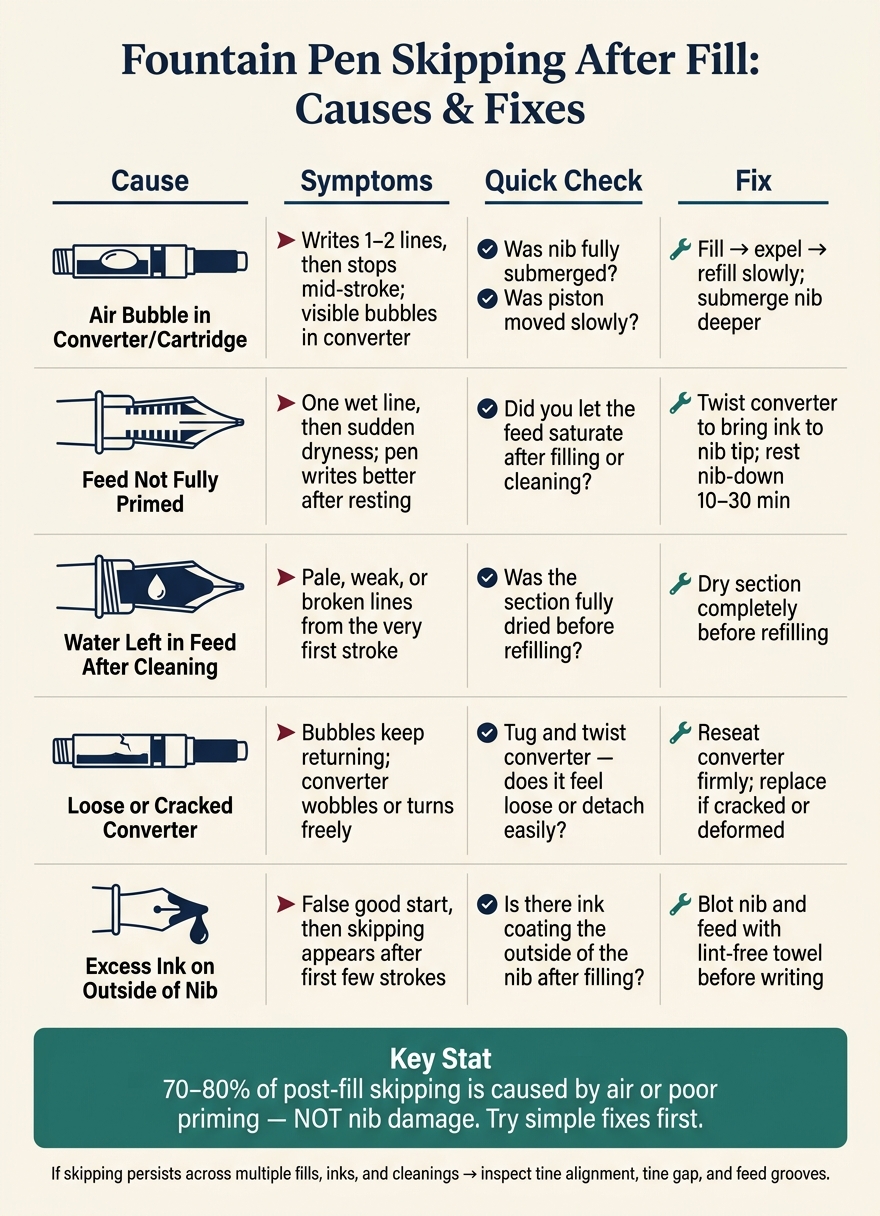
Fountain Pen Post-Fill Skipping: Causes, Symptoms & Fixes
Fountain Pen Skipping Issues Resolved | Easy Fixes That Actually Work
Air Bubbles in the Converter or Cartridge
A trapped bubble can cut off ink flow after the first few strokes. If that bubble sits between the ink supply and the feed, the flow gets interrupted, and the nib can go dry right in the middle of a stroke.
How Trapped Air Forms During Filling
Shallow submersion or moving the piston too fast can trap air in the converter or cartridge. If the nib isn’t deep enough in the ink bottle, part of the feed may stay above the ink surface. That gives air a way in right alongside the ink. And if you move the piston too fast, you can whip air into the ink, leaving small bubbles or one larger pocket that may drift toward the feed end while you write.
A loose converter can also let air back in after filling. If the converter wobbles or turns freely after you seat it, air can leak in at the joint with the section. That’s a different problem from poor filling technique. In this case, the issue usually keeps coming back until you reseat the converter or swap it out.
How to Remove Bubbles and Refill Correctly
A dependable fix is to fill, empty, and refill. Fully submerge the nib, fill the converter slowly, push most of the ink back into the bottle while the nib is still submerged, then fill again. That cycle helps push air out of the feed channels and replace it with ink.
After filling, hold the pen nib-up and gently tap the barrel. Any bubbles left inside should move away from the feed and toward the back of the converter. Then advance the piston slowly until a small bead of ink appears at the feed or nib tip.
| Issue Category | Symptoms | Quick Check | Fix |
|---|---|---|---|
| Filling Technique | Writes well for a line or two, then skips; visible bubbles in the converter | Was the nib fully submerged? Was the piston moved slowly? Was the pen recently cleaned and not fully dried? | Fill, empty, and refill; submerge deeper; slow down piston movement |
| Hardware Issue | Bubbles form at the converter–section joint; converter wobbles or turns freely | Tug and twist the converter - does it feel loose or detach easily? | Reseat the converter firmly; replace it if cracked or deformed |
If the pen still skips after you remove the bubbles, the feed may not be fully primed.
Incomplete Priming and Uneven Feed Saturation
Even if the converter is bubble-free, the pen can still skip because the feed isn't fully saturated yet. That's a common gotcha. A full converter only tells you the ink reservoir is full. It does not mean ink has worked all the way through the feed.
Right after filling or cleaning, the nib may write for a moment using ink that's sitting on the surface, then go dry until the feed finishes wetting out.
Signs the Feed Is Not Fully Primed
The most obvious sign is one wet line followed by sudden dryness. You may also see pale writing right after cleaning. In most cases, that means rinse water is still thinning the ink inside the feed.
Another clue: the pen writes better after sitting unused for a few minutes. That usually means ink is slowly moving into the feed on its own.
And if the pen only writes when you press harder, that's a sign too. Extra pressure can push ink out for a second, but it won't solve a dry feed.
Simple Ways to Prime the Feed
The fastest fix is to twist the converter just enough to bring ink to the nib tip. Then wipe off any extra ink before you start writing. Go easy here. Too much, and you can flood the nib.
If you don't want to do that, let the pen rest nib-down for 10–30 minutes after filling. Gravity can help pull ink into the feed without much fuss.
A light barrel tap can also help move ink into dry spots. Just keep it gentle. This is only for loosening a small air pocket, not for saturating the whole feed.
One step people often skip is to dry the section fully before refilling after flushing or washing. If rinse water is left behind, it can dilute the ink and slow saturation. The result is pale writing or uneven flow from the very first stroke.
| Priming Method | Ease | Mess Risk | Best Use Case |
|---|---|---|---|
| Converter piston twist | High | Moderate | Immediately after a fresh fill when you need the pen to start writing right away |
| Nib-down resting | Very easy | Very low | After refilling or cleaning when the feed needs time to saturate |
| Light barrel tap | Moderate | Low | Dislodging small air pockets when the feed is only slightly under-primed |
| Dry section before refilling | Easy but time-consuming | Very low | After flushing or washing to prevent water-diluted ink and uneven saturation |
Right after a fresh fill, the feed may still need a little time to saturate. If priming doesn't bring back steady flow, the next things to check are the converter fit and the nib surface.
sbb-itb-1dd4fe9
Converter Seating, Excess Ink on the Nib, and Air Exchange
If priming the feed still doesn't stop the skipping, take a look at the converter and the ink sitting on the nib.
Sometimes the issue isn't the feed at all. A loose or cracked converter can interrupt ink flow right after filling, even if everything else looks fine.
How to Check Converter Fit and Seal
Pull the converter off and inspect the opening closely. Tiny cracks around the lip can ruin the seal. Then check the section's nipple - the small post the converter slides onto. If there's dried ink or debris on that post, the converter may not sit all the way down.
When you put the converter back on, press it straight and firmly until it won't move any farther. If it still wobbles after that, swap it out.
If the converter is seated the way it should be, the next issue may be simpler: ink is wetting the outside of the nib, but not feeding through the pen the way it should.
Why Blotting the Nib Helps Prevent False Starts
A fresh fill can leave extra ink on the outside of the nib. That can hide a weak feed for a moment and make the pen seem fine when it isn't. Blot the nib and feed with a lint-free paper towel before you start writing.
Don't shake the pen to get ink moving. It may seem like a fast fix, but it can add new air bubbles to the converter and make the flow problem worse.
If the converter is seated well and the nib is blotted, the next thing to check is residue that may be slowing ink movement.
When Ink Won't Move Cleanly
Some converters pick up residual manufacturing oils or dried ink film inside the chamber. When that happens, ink can cling to the back wall instead of moving forward. If you see a bubble that doesn't move after a gentle tap, that's usually a sign of a flow problem, not normal air from filling.
A thorough flush with clean, room-temperature water will often clear that film and bring the flow back to a steady state.
When Skipping Continues After These Fixes
If the pen still skips after those fixes, the next place to check is the nib and feed. At that point, it usually makes sense to stop guessing and look at the parts that control ink flow.
Key Checks Before Blaming the Nib
Do one more clean fill test first. Refill with the nib fully submerged, expel and refill once, prime if needed, and make sure the converter or cartridge is seated firmly. Then test on fresh paper.
If it still skips, inspect the nib and feed directly.
Signs the Nib or Feed Needs Closer Inspection
If skipping keeps happening across multiple refills, repeated cleanings, and different inks, it’s time to look more closely at the hardware. Start with the simplest visible checks.
Check for:
- tine alignment
- tine gap
- dried ink or paper fibers in the feed grooves
An over-polished tipping edge can also stop the nib from making steady contact with the page.
If the pen is still unreliable after all of these steps, replacement parts are often the most practical next move.
FAQs
Why does my pen write, then skip?
If your pen writes once and then skips, the problem is often simple: the feed isn’t getting ink back to the nib fast enough after filling.
The usual culprits are:
- air bubbles stuck in the ink path
- a converter that isn’t seated all the way
- dried ink in the feed
Start by checking that the converter is firmly seated. If it’s even slightly loose, ink flow can get spotty.
You can also expel the ink and refill the pen. That often clears trapped air bubbles and gets the ink moving again. If the issue still sticks around, flush the nib and feed with cool water to wash out any dried residue that may be blocking flow.
How can I tell if the converter is the problem?
Check whether the converter is seated firmly in the grip section. If it sits loose or you can see gaps, the seal may fail and ink flow can become uneven.
If the fit looks secure, check for persistent air bubbles, cracks, a stiff piston, or ink leaking behind the seal. If cleaning and reseating don't fix the problem, the converter may be worn out or defective.
When should I check the nib and feed?
Check the nib and feed any time you notice skipping, uneven ink flow, hard starts, or a scratchy feel. A quick visual check once a month can help you spot misaligned tines, bent tips, or loose parts before they turn into a bigger headache.
If you’ve already flushed the pen and it’s still acting up, take a closer look for gaps, debris, or tines that aren’t lined up. Also make sure the nib slit sits centered over the feed channel.