

If your fountain pen skips, writes faintly, or struggles to start, these issues usually stem from common problems that are easy to fix. Here's a quick summary of the 7 main causes of poor ink flow and how to address them:
- Dried Ink or Clogs: Ink residue can block the feed. Flush the pen with water or soak it to clear hardened ink.
- Misaligned or Tight Tines: Uneven nib tines cause scratchy writing or dry lines. Use a loupe to inspect and gently adjust them.
- Nib and Feed Misalignment: If the nib and feed aren't properly aligned, ink flow suffers. Reseat them carefully.
- Ink Compatibility: Thick or dry inks may not suit your pen. Switch to a wetter ink like Pilot or Diamine for smoother flow.
- Cartridge or Converter Issues: Airlocks or improper seating can block ink. Reseat the cartridge or replace faulty converters.
- Paper, Angle, and Pressure: Rough or absorbent paper, incorrect writing angles, or heavy pressure can disrupt flow. Use smooth paper and a light touch.
- Improper Storage: Leaving a pen uncapped or in a dry environment can dry out ink. Store pens horizontally and cap them tightly.
Quick Comparison
| Cause | Symptoms | Fix |
|---|---|---|
| Dried Ink / Clogged Feed | Skipping, hard starts, scratchy lines | Flush or soak nib and feed |
| Misaligned / Tight Tines | Scratchy strokes, uneven ink flow | Inspect and adjust tines with a loupe |
| Nib and Feed Misalignment | Weak or inconsistent flow | Reseat nib and feed |
| Ink Compatibility | Dry, faint lines or skipping | Switch to a wetter ink |
| Cartridge / Converter Issues | Ink visible but not flowing | Reseat cartridge or replace converter |
| Paper, Angle, Pressure | Feathering, skipping, scratchy writing | Use smoother paper, adjust grip/angle |
| Improper Storage | Hard starts, dried ink | Cap tightly, store horizontally |
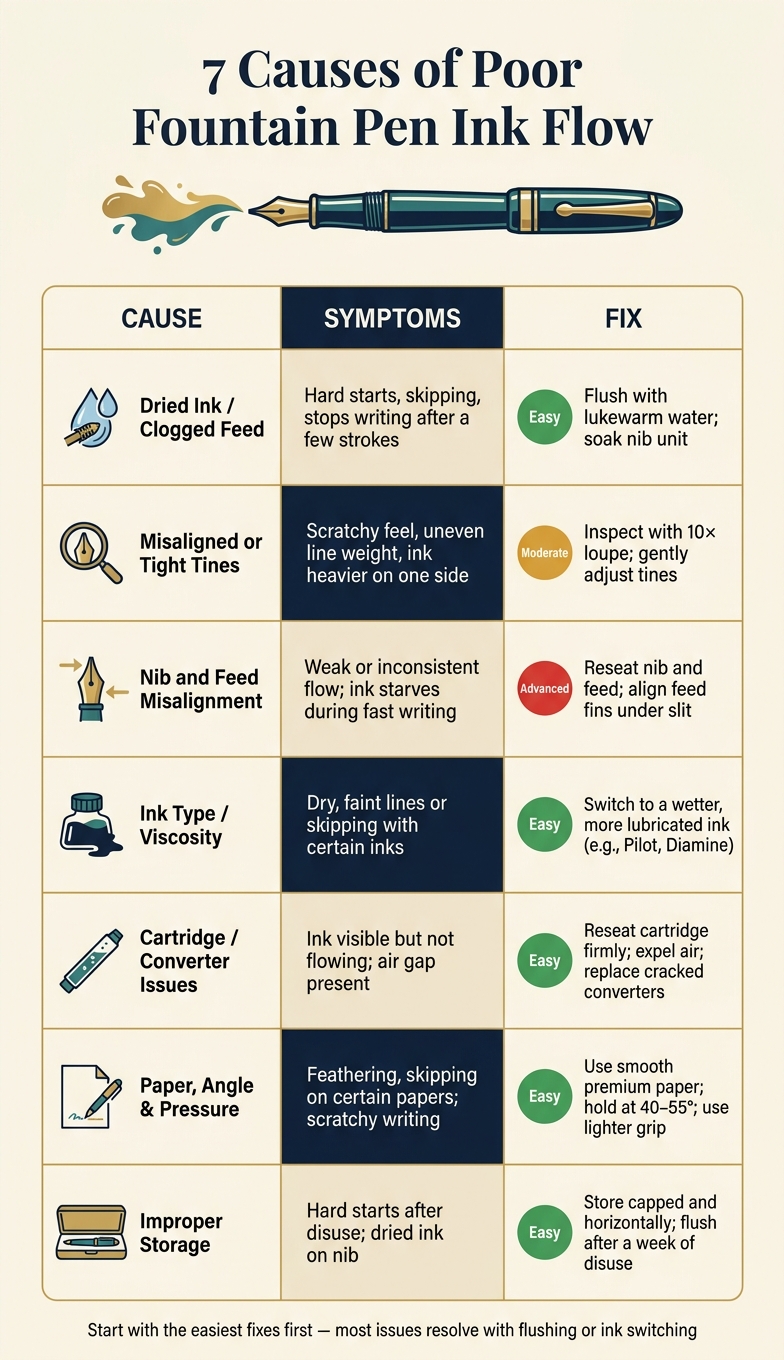
7 Causes of Poor Fountain Pen Ink Flow: Symptoms & Fixes
What to do when your fountain pen won't write.
sbb-itb-1dd4fe9
1. Dried Ink and Clogged Feeds
If your fountain pen suddenly stops writing smoothly, dried ink and clogged feeds are often the culprits. When ink sits idle in the feed, water evaporates over time, leaving behind a thicker residue that disrupts the flow.
As one fountain pen enthusiast explains:
"Ink drying inside a fountain pen is fundamentally a process of evaporation."
This evaporation process leads to telltale issues. You might notice hard starts, skipping, or even a complete failure to write - even when the reservoir is full. The pen may feel scratchy or deliver inconsistent ink flow.
The severity of the clog often depends on how long the pen has been unused. A few idle days might cause minor flow issues that resolve with a few strokes, but weeks of inactivity - especially in warm or dry conditions - can lead to hardened residue that requires more effort to remove. Factors like low humidity, heat, and poorly sealed caps can speed up the drying process. Additionally, inks with heavy dyes, shimmer, or permanent properties tend to leave behind more stubborn deposits.
For mild clogs, simply dipping the nib in water and blotting it gently can help. For tougher cases, repeated flushing or soaking the nib and feed may be necessary. As another enthusiast wisely points out, "Allowing water time to penetrate dried ink is more effective than force." Heavily pigmented or shimmer inks might need several cycles of soaking and flushing to fully restore the pen's flow.
To avoid clogs altogether, make a habit of capping your pen securely, storing it horizontally, and keeping it away from heat or direct sunlight. These small steps can go a long way in maintaining a smooth writing experience.
2. Misaligned or Overly Tight Nib Tines
Once you've cleared any clogs, the next step to ensure smooth ink flow is checking the alignment of the nib.
The nib's two tines create a narrow slit that serves as the ink channel between the feed and the paper. If these tines are misaligned or pressed too tightly together, the ink flow can be disrupted.
When the tines are misaligned, you'll notice scratchiness during certain strokes. For example, the nib may glide smoothly on downstrokes but catch or drag on horizontal or upward strokes. This happens because one tine sits slightly higher than the other, causing uneven contact with the paper and breaking the ink flow. On the other hand, overly tight tines create a different problem: the pen writes, but the lines appear faint and dry, even with well-saturated ink. This occurs because the slit is too narrow for adequate ink to pass through.
To check for these issues, inspect the nib under bright light using a desk lamp or your phone's flashlight. The tines should form a smooth and symmetrical curve. If one side appears higher or there's a noticeable step, the tines are misaligned. If the slit looks almost pinched shut compared to other nibs, the tines are too tight. A 10× jeweler's loupe can make this inspection much easier and is a handy tool to have.
For minor misalignment, gently nudge the higher tine with your thumbnail in small, controlled movements until the writing feels smooth. Writing slow figure-8 patterns in all directions can help confirm the adjustment. If the tines are too tight, carefully insert a 0.002-inch brass shim into the slit to create more space—a common adjustment for flex fountain pens—and rinse the nib thoroughly afterward. Be cautious not to over-widen the slit, as this can lead to leaks. If the nib is visibly damaged or the tines cross over one another, it's best to seek help from a professional nibmeister.
3. Nib and Feed Misalignment
Sometimes, even with perfectly aligned tines, your pen might still skip or write dry. This could be due to a misalignment between the nib and feed. The feed, the plastic or ebonite piece beneath the nib, plays a critical role in channeling ink from the reservoir to the nib through a capillary system. If the feed shifts even slightly, that delicate ink pathway can break, causing inconsistent ink flow. This issue often persists even after fixing tine alignment, highlighting how crucial proper nib-feed contact is.
Common symptoms include hard starts, skipping mid-stroke, or ink flow that only works under pressure. You might also notice the feed appears off-center when viewed head-on or see a gap between the nib and feed. Unlike tine problems, this misalignment tends to cause issues regardless of the ink or paper you use, making it easier to pinpoint.
Misalignment often happens during cleaning or disassembly. Removing or reinserting the nib and feed can shift them slightly, disrupting the capillary action. Dropping the pen or frequently removing the nib unit can also loosen the friction fit, especially in pens priced between $15 and $40.
To fix this, carefully reseat the nib and feed. Pull them straight out to avoid twisting, and pay attention to the feed's fin orientation before removal. When reinserting, ensure the feed's central ink channel aligns directly under the nib slit. The feed should sit flush against the underside of the nib with no visible gap, and the nib shoulders should align with or slightly extend past the section's front edge. Push them back in evenly until secure. If the fit is tight, a rubber grip can help.
After reseating, rinse the pen, fill it with a dependable ink, and test it with varied strokes. If the ink flow improves and hard starts disappear, the nib-feed contact was likely the issue. Avoid using metal tools during this process to prevent damage to the nib or feed. For pens with hooded nibs or captive feed units, avoid forcing anything apart - these require professional help from a nibmeister.
4. Ink Type, Viscosity, and Compatibility
Ink properties play a big role in how smoothly your pen writes. While mechanical tweaks can help, adjusting your ink choice is often a simpler fix for improving flow.
Fountain pen inks differ in viscosity, lubrication, surface tension, and dye or pigment concentration. These factors influence how the ink travels through the feed and onto the paper. For example, thicker, drier inks can slow the flow, leading to issues like hard starts or skipping - especially in pens with fine nibs or restrictive feeds. On the other hand, thinner, wetter inks flow more easily but may feather or bleed on lower-quality paper.
A good rule of thumb: match your ink's wetness to your pen's performance. If your pen feels dry or skips, try a wetter ink with better lubrication. If it lays down too much ink, opt for a drier formula. Brands like Noodler's and Sailor are known for wetter inks, while Pelikan 4001 and some Aurora inks tend to be drier. Many experienced fountain pen users rely on these differences to fine-tune their pen's flow without making physical adjustments to the nib.
Specialty inks, like shimmer, iron gall, or pigmented types, require extra care. These inks can restrict flow over time, so regular flushing - about every two weeks if used frequently - is essential. They're also better suited for medium or broad nibs. Avoid using India ink, acrylic ink, or dip-pen calligraphy inks in fountain pens, as they can harden and permanently clog your pen's feed.
If you suspect your ink is causing flow issues, flush your pen thoroughly and refill it with a reliable dye-based ink like Pilot, Diamine, Organics Studio, or Waterman. If the flow improves after switching inks, then the issue likely lies with the previous ink, not the pen itself. Affordable pens from brands like Fountain Pen Revolution are great for experimenting with different inks since they feature replaceable nibs and feeds, making them low-risk for testing.
| Ink Type | Flow Behavior | Maintenance Level |
|---|---|---|
| Standard dye-based inks | Smooth, consistent, and compatible with most pens | Low - flushes out easily |
| Iron gall inks | Flows well initially but thickens over time | Medium - requires regular flushing |
| Nano-pigmented inks | Waterproof but prone to particle buildup | Medium-high - frequent flushing needed |
| Shimmer/glitter inks | May clog fine feeds; works best in broader nibs | High - clean every 1–2 weeks |
| India/acrylic/dip-pen inks | Not safe for fountain pens; can cause permanent clogs | Not applicable - avoid entirely |
5. Cartridge, Converter, and Filling Issues
Sometimes, the problem with ink flow isn’t the nib or feed - it’s the cartridge or converter. This is a surprisingly common issue and often misdiagnosed.
One telltale sign is a pen that writes fine for a few words and then suddenly stops. Another clue? The pen only works when held at a specific angle. If you remove the cartridge and notice a faint dent instead of a clean puncture on the nipple, the cartridge wasn’t fully pierced. The solution? Push the cartridge firmly and straight onto the feed’s piercing post until it clicks or stops. Also, keep an eye out for trapped air, which can create similar symptoms.
Airlocks happen when a large air bubble blocks the ink from reaching the feed. You may see ink in the converter, but none flows to the nib. To fix this, hold the pen nib-up and gently tap it against a paper towel, or twist the piston forward slightly. When filling your pen, doing two or three fill-and-expel cycles can help remove air before it becomes a problem.
Another issue could be hairline cracks in the cartridge or converter, which let air in and disrupt the flow. If ink pools at the back of the converter instead of flowing forward, or the piston feels rough or jerky after cleaning, it’s time to replace the converter. Standard international converters are affordable, costing between $4 and $10 in the U.S., and they’re a simple way to test if the converter is causing the problem. Fountain Pen Revolution provides budget-friendly options that are great for troubleshooting.
Regular care can prevent many of these issues. Flush your converter with lukewarm water every time you change inks - or at least every few weeks if you use heavily saturated or pigmented inks. Repeat the fill-and-expel process until the water runs clear. Occasionally, add a drop of mild dish soap to lukewarm water, flush, and rinse thoroughly. Never use hot water or alcohol, as these can warp plastic and damage seals.
| Issue | What You'll Notice | Fix |
|---|---|---|
| Cartridge not fully seated | Writes briefly, then stops; faint or no puncture mark | Press firmly until it clicks; hold nib-down briefly |
| Airlock in converter | Ink visible but nothing reaches the nib | Hold nib-up, tap on paper towel; twist piston forward slightly |
| Cracked or worn converter | Skipping, ink hanging in reservoir, rough piston | Replace converter ($4–$10 for standard international models) |
| Residue from previous ink | Sluggish flow, ink sticking to converter walls | Flush with lukewarm water; use mild dish soap periodically |
| Incompatible third-party parts | Leaking, poor seal, inconsistent flow | Use brand-matched or standard international components |
Taking these steps wraps up our discussion of common ink flow problems, ensuring your fountain pen performs at its best.
6. Paper Type, Writing Angle, and Pen Pressure
The way your pen performs isn't just about the pen itself - factors like the type of paper you use and how you write play a big role in how smoothly ink flows. For example, highly absorbent paper can pull ink too quickly, leading to feathering and blurry lines. Rough paper, on the other hand, creates extra friction, which can make writing feel scratchy and disrupt the flow of ink.
"Highly textured or very absorbent paper can create more resistance for the nib." - Scriveiner
Switching to smoother, coated paper can make a noticeable difference. Ferris Wheel Press explains:
"Higher quality paper with controlled surfaces is less affected [by humidity]. It tends to: Maintain line sharpness, Resist excessive absorption, Provide more consistent results."
So, if you're dealing with feathering or uneven lines, it might be time to try a smoother, coated paper.
But paper isn't the only factor. The angle at which you hold your pen also matters. Fountain pens work best when held at an angle of about 40–55° to the page. If the pen is too upright or too flat, the nib tines may not make proper contact with the paper, which can restrict ink flow and affect your writing.
Your grip and pressure are just as important. Fountain pens rely on capillary action to draw ink, so pressing too hard can split the nib tines or even damage the nib tip. It can also cause the tines to snag on paper fibers, disrupting your writing. Instead, use a light grip and let the pen's weight guide your strokes. If you're used to ballpoint pens, this lighter touch might feel unfamiliar at first, but with a little practice, it can greatly improve both the flow of ink and the overall experience of writing.
7. Improper Storage and Drying Out
When it comes to fountain pens, how you store them plays a big role in preventing ink flow issues. Improper storage can lead to ink drying out, which causes a host of problems.
If a pen isn’t capped properly or is poorly sealed, air gets in and starts drying the water-based ink. This thickened ink struggles to flow through the feed, leading to issues like hard starts (where the pen won’t write immediately) or skipping during the first few lines. Over time, as more water evaporates, the ink becomes overly concentrated, often appearing darker on the page. In extreme cases, dried ink residue can clog the feed channels entirely, leaving the pen unusable even if the reservoir is full.
"Ink drying inside a fountain pen is not a sign of poor care or inferior equipment. It is the natural result of water-based ink interacting with air over time." - Thomas Whitake, Fountain Pen Enthusiast
To avoid this, proper storage is essential. Environmental factors, like dry winter air or air-conditioned spaces, can accelerate evaporation by pulling moisture through even tiny gaps in the cap’s seal. Heat sources, such as radiators or electronics, make the problem worse. To keep ink flowing smoothly, store your pen horizontally in a cool, stable location, away from direct sunlight and air vents. This prevents uneven ink distribution and keeps the feed from drying out.
If your pen has already dried out, there are ways to fix it depending on how severe the issue is. For minor hard starts, try dipping the nib in clean water and blotting it - this rehydrates the feed without needing to take the pen apart. If the pen hasn’t been used for weeks, flush it with room-temperature water and soak the nib unit to dissolve any hardened ink. As a general rule, flushing your pen after a week of disuse helps avoid long-term clogs.
Comparison Table
Understanding why your fountain pen's ink flow falters is key to getting it back in working order. The tables below break down common causes, symptoms, and fixes, making it easier to pinpoint and resolve poor ink flow issues. Start with Table 1 for a quick overview of potential problems and solutions.
Table 1: Cause, Symptoms, and Fix at a Glance
| Cause | Common Symptoms | Recommended Fix | Difficulty |
|---|---|---|---|
| Dried ink / clogged feed | Hard starts, skipping, stops writing after a few strokes | Flush with lukewarm water; soak nib unit; use a bulb syringe or commercial pen flush | Easy (5–10 min) |
| Misaligned or overly tight tines | Scratchy feel, uneven line weight, ink heavier on one side | Inspect with a 10× jeweler's loupe; gently adjust tines; consult a nibmeister for expensive pens | Moderate to Advanced |
| Nib and feed misalignment | Smooth feel but weak or inconsistent flow; ink starves during fast writing | Disassemble nib unit if possible; align feed fins under the slit; reseat nib and feed snugly | Moderate (15–30 min) |
| Ink type / viscosity / compatibility | Writes dry with certain inks but works well with wetter inks | Switch to a more lubricated ink; clean more often when using iron gall or shimmer inks | Easy |
| Cartridge / converter / filling issues | Ink visible but not flowing; air gap present; flow improves after manipulation | Reseat cartridge firmly; twist converter to expel a drop and prime feed; replace cracked converters | Easy (5 min) |
| Paper type / writing angle / pressure | Skipping on certain papers; feathering on cheap paper; smooth flow on quality paper | Test on premium paper; adjust writing angle (40–55° range); use a lighter grip | Easy |
| Improper storage / drying out | Hard starts after disuse; ink dried on nib; no flow despite full reservoir | Store capped and horizontally; flush after a week of disuse; for long-term storage, flush and store empty | Easy |
If flushing solves the issue, dried ink was likely the problem. If the issue persists across different inks and papers, focus on the nib, feed, or filling system.
For adjustments like tine alignment, practice on a less expensive pen first. If you're unsure about handling high-value or vintage pens, consult a professional nib specialist. For affordable replacement nibs, check out Fountain Pen Revolution, which makes experimenting less risky.
Table 2: Ink and Paper Combinations and What They Tell You
Beyond mechanical fixes, Table 2 helps you understand how ink and paper choices can impact your pen's performance.
| Ink Behavior | Paper Type | Typical Result | What It Suggests |
|---|---|---|---|
| Wet / lubricated ink | Premium smooth paper (24 lb or 90–100 gsm) | Dark, consistent lines; minimal feathering | If skipping persists, the issue is likely mechanical, not ink or paper |
| Wet / lubricated ink | Cheap 20 lb copy paper | Feathering, spread, and bleed-through | Paper is too absorbent - try higher-quality paper |
| Dry / low-lubrication ink | Cheap 20 lb copy paper | Controlled lines, less feathering; may feel scratchy | If skipping occurs, the problem could lie with the pen or nib |
| Dry / low-lubrication ink | Premium smooth paper | Crisp, fast-drying lines | A very dry line may indicate the ink is too dry for your nib size |
| Sheening or shimmer ink | Cheap 20 lb copy paper | Heavy feathering, bleed-through, possible clogging | Paper limits performance; these inks need higher-quality paper |
| Sheening or shimmer ink | Premium smooth paper (90–100 gsm) | Rich color, strong sheen, broader lines, slower drying | Poor flow on smooth paper suggests the ink may be too thick - try a broader nib |
To use this table effectively, follow these two steps:
- Test your pen with a wet, standard blue or black ink on smooth premium paper. If the flow is still poor, the issue is mechanical.
- Switch back to your original ink on the same paper. If problems occur only with the original ink, its formulation may not suit your pen.
Conclusion
This guide has highlighted the seven main culprits behind poor ink flow: dried ink and clogged feeds, misaligned or overly tight tines, nib and feed misalignment, ink viscosity and compatibility, issues with cartridges, converters, or filling systems, paper type, writing angle, or pressure, and improper storage. Thankfully, most of these problems can be fixed with simple steps like flushing your pen, inspecting the nib, and storing it correctly.
Routine upkeep plays a big role in keeping your pen writing smoothly. Flushing your fountain pen every three to four weeks helps clear out dried ink that often causes skipping or hard starts. Small habits, like capping your pen when not in use and avoiding heat sources, can also make a noticeable difference - especially in the U.S., where air conditioning and heating can speed up ink evaporation. If you're just starting out or want affordable options, Fountain Pen Revolution offers pens, nibs, and inks with user-friendly features like removable nibs and standard converters. Their starter sets begin at $35, making them a great choice for beginners.
FAQs
How can I tell if my pen’s problem is ink, paper, or the nib/feed?
To figure out what's wrong with your fountain pen, consider these steps:
- Ink: Check if the pen has the right type of fountain pen ink and ensure it's not empty or clogged.
- Nib and Feed: Inspect for any misalignment, debris, or dried ink. If you spot an issue, a good cleaning might solve it.
- Paper: Make sure you're using paper that's compatible with fountain pens. If the pen works well on high-quality paper but struggles on regular paper, the problem is likely with the paper itself.
What’s the safest order to troubleshoot poor ink flow without damaging my pen?
To address poor ink flow safely, follow these steps:
- Verify the cartridge or converter is installed correctly to avoid leaks or flow interruptions.
- Inspect the ink levels and refill if they’re low.
- Rinse the pen with lukewarm water to remove any clogs.
- Soak the nib and feed to loosen any hardened ink residue.
- Gently clean the nib slit using a soft, non-abrasive tool.
- Check and align the nib carefully, ensuring no excessive pressure is applied.
When should I stop adjusting the nib and contact a nibmeister?
If you've tried troubleshooting ink flow issues - like cleaning the nib, realigning the tines, or adjusting the feed - and the problem persists, it’s time to stop tinkering and consult a nibmeister. Persistent issues such as misalignment, scratchiness, skipping, hard starts, or uneven ink flow often require professional expertise. Additionally, if the nib is physically damaged (like bent tines or chips), attempting to fix it yourself could make things worse. A professional repair will ensure your pen is restored without risking further harm.