

Nothing ruins the joy of writing like a pen that skips. But here’s the good news: most skipping issues are fixable with simple steps. Whether it’s dried ink, a clogged nib, or alignment problems, you don’t have to toss your pen. Here’s how to fix it:
- Clean your pen: Dried ink or blockages cause ~80% of skipping problems. Rinse with water or use a cleaning solution for stubborn clogs.
- Check the nib: Misaligned tines or gaps in the nib can disrupt ink flow. Inspect with a magnifying glass and adjust gently.
- Choose better ink and paper: Low-quality paper and incompatible inks can worsen skipping. Stick to fountain pen-friendly supplies.
- Prevent future issues: Regular cleaning, proper storage, and using the right ink/paper combo can keep your pen working smoothly.
If cleaning and adjustments don’t work, it may be time for professional help. Follow these steps to save your pen and restore smooth writing. Keep reading for detailed fixes and tips.
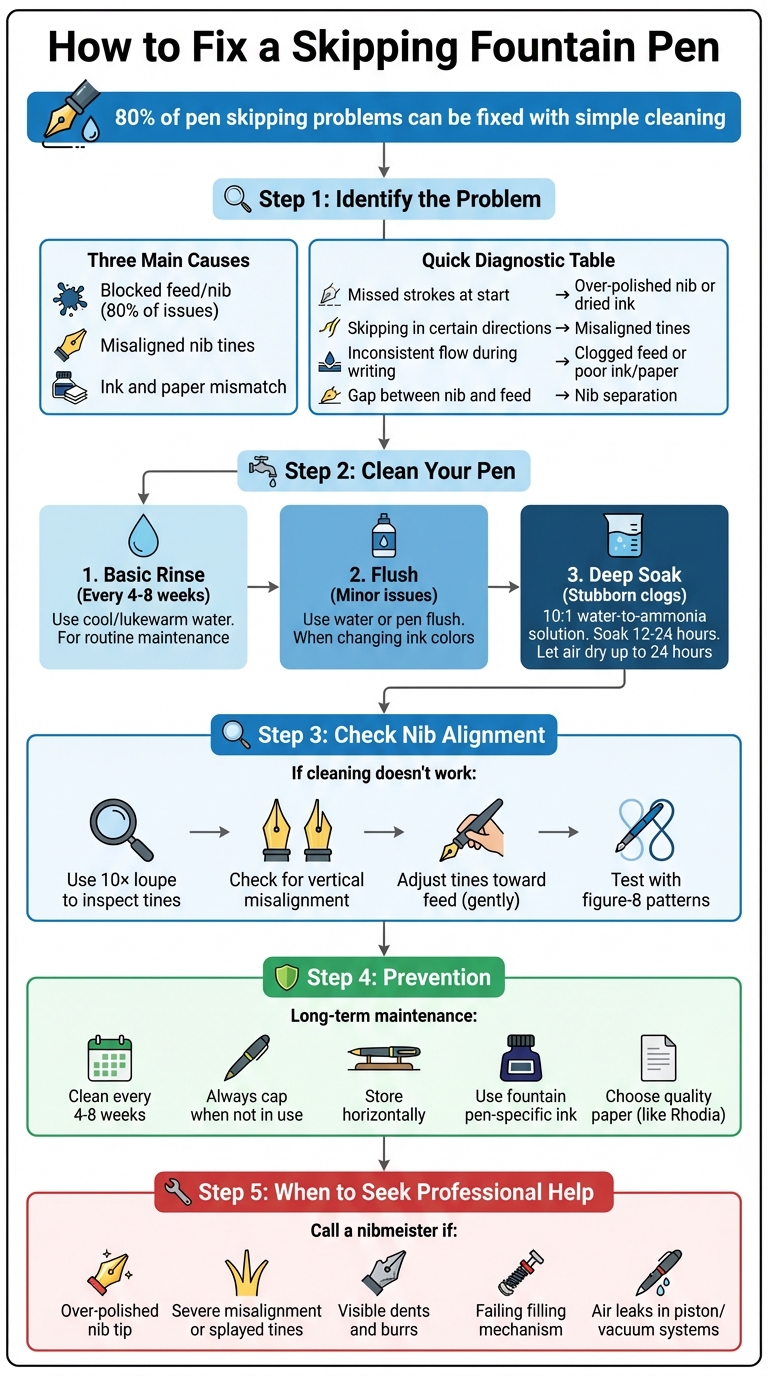
Step-by-step guide to diagnosing and fixing a skipping fountain pen
Skipping Fountain Pens & Troubleshooting
Common Causes of Pen Skipping
Figuring out why your pen skips is the first step toward fixing it. Most skipping problems boil down to three main issues: blockages in the feed or nib, misaligned nib tines, or an ink and paper mismatch. By identifying the root cause, you can take targeted steps to solve the problem. Let’s break down each of these common culprits.
Blocked Feed or Nib
Blockages are often the main reason pens skip. Dried ink - especially from leaving a pen uncapped - or leftover manufacturing oils can clog the feed and nib. On top of that, paper fibers and dust can get trapped between the nib tines, restricting ink flow. If you’re using inks with glitter particles, these can build up and make things worse.
"Clean your pen! Seriously, it's the magical cure for about 80% of pen issues." - Brian K., The Goulet Pen Company
Misaligned Nib Tines
Misaligned nib tines are another common cause of skipping. Sometimes, the tipping material on the nib is over-polished into a rounded "V" or "U" shape. This creates a gap that stops the ink from properly reaching the paper, leading to hard starts and uneven flow. Vertical misalignment - where one tine sits higher than the other - can cause scratchy writing and skipping in certain directions. Additionally, if the tines are pressed too tightly or spaced too far apart, the capillary action needed for smooth ink flow is disrupted. In more severe cases, the nib may even detach slightly from the feed, completely cutting off ink delivery.
Ink and Paper Problems
Even a good pen can skip if the ink and paper don’t work well together. Inks with high surface tension may not flow quickly enough, especially in pens that already have restricted flow. Switching to a "wetter" ink, like Pilot Iroshizuku or Sailor Jentle, can often solve this. Air leaks from cracked cartridges or faulty converters can also disrupt the vacuum needed for consistent ink delivery. Low-quality paper tends to shed fibers that clog the nib, while paper that’s too smooth can make it harder for ink to transfer - particularly if the nib has alignment issues.
| Skipping Indicator | Likely Root Cause |
|---|---|
| Missed strokes at the start of words | Over-polished nib tip or dried ink in nib |
| Skipping only on certain stroke directions | Misaligned or uneven nib tines |
| Inconsistent flow during long writing sessions | Clogged feed or poor ink/paper combo |
| Visible gap between nib and plastic feed | Separation of the nib from the feed |
How to Fix a Skipping Pen
To fix a skipping pen, start by identifying the issue and begin with cleaning. Test the pen after each step. If cleaning doesn’t solve the problem, move on to adjusting the nib alignment.
Clean Your Pen
Start with a simple rinse. Remove the ink cartridge or converter from the pen's grip section, and rinse the nib and feed under cool running water for several seconds. Use a converter or bulb syringe to push clean water through the nib and feed until the water runs clear. Avoid using hot water, alcohol, or acetone, as these can damage your pen.
For stubborn clogs, try a deep soak. Mix a drop of dish soap with water or prepare a 10:1 water-to-ammonia solution. Immerse the nib and feed in this solution for 12 to 24 hours, then rinse thoroughly with plain water to remove any residue. If your tap water has high mineral content, use distilled water to prevent deposits from forming. After rinsing, blot the nib dry and let it air dry completely (up to 24 hours) before re-inking.
| Cleaning Method | When to Use | Solution Used |
|---|---|---|
| Basic Rinse | Routine maintenance (every 4–8 weeks) | Cool or lukewarm water |
| Flush | Changing ink colors or minor skipping issues | Water or commercial pen flush |
| Deep Soak | Persistent skipping or dried ink clogs | Water with dish soap or 10:1 ammonia solution |
If the pen continues to skip after cleaning, it’s time to check the nib alignment.
Align the Nib Tines
When cleaning doesn’t fix the issue, inspect the nib tines using a 10× loupe or magnifying glass. Look at the nib’s tip where it touches the paper - this is the "angle of attack." Check if one tine is raised higher than the other. If you spot vertical misalignment, gently press the higher tine toward the feed using your fingernail.
If the tines are pressed so tightly together that no light can pass through the slit, carefully insert a thin piece of paper between them to create a slight gap.
"Always push them [tines] down toward the feed, go slow, be patient, and test often."
- Brian K., The Goulet Pen Company
For tines that are spread too far apart, remove the nib and press it against a flat surface. Roll it horizontally from left to right to straighten the metal. Ensure the nib slit stays centered over the feed's ink channel, as an off-center nib can lead to uneven ink flow. Keep in mind that manually adjusting the nib may void the manufacturer’s warranty, so proceed carefully.
Test Your Repairs
After cleaning or adjusting the nib, test the pen by drawing lines in different directions and practicing continuous figure-eights. This helps check for consistent ink flow. If the pen skips or feels uneven, make further adjustments.
You can also perform a fingernail test - run your nail across the nib tines. If your nail catches on an edge, one tine is likely higher than the other. Before testing, blot the nib on a paper towel to remove excess moisture from cleaning, as leftover water can dilute the ink and mimic skipping. Write on both smooth and textured paper to ensure the pen works well on different surfaces. If issues persist, repeat cleaning or alignment as needed.
sbb-itb-1dd4fe9
How to Prevent Skipping Problems
After tackling immediate fixes, it’s time to focus on long-term strategies to keep your fountain pen performing smoothly.
Choose the Right Ink and Paper
The ink and paper you use can make or break your pen's performance. Always stick to fountain pen ink - other types often contain binders that can clog the feed. As Shawn Buckles from One Pen Show aptly puts it, using the wrong ink is like "pouring glue into a car engine".
If your pen has a tight feed, opt for wetter inks. Brands like Sailor Jentle, Pilot Iroshizuku, and Diamine are known for their smooth flow. For affordable yet reliable options, check out Fountain Pen Revolution, which offers inks designed specifically for fountain pens.
Paper quality is just as important. Smooth, high-quality paper - like Rhodia - prevents fibers from catching in the nib tines, a common cause of skipping. On the other hand, rough or low-quality paper can shed fibers that clog the nib slit and disrupt ink flow.
Proper Storage and Regular Maintenance
Beyond selecting the right supplies, how you store and care for your pen plays a huge role in preventing skipping. Always cap your pen when not in use to stop the ink from evaporating and clogging the feed. Store your pen horizontally to keep the feed saturated and avoid leaks. Storing it nib-up can lead to hard starts, while nib-down increases the risk of leaks.
Regular cleaning is essential, even if your pen seems to be working fine. Flush your pen every four to eight weeks to remove dust, paper fibers, and dried ink. If you’re switching inks, always clean the pen first to avoid chemical reactions or muddy colors.
"Cleaning a fountain pen is essentially rebooting it, you'll flush out any dried ink or blockages that may have developed over time, and you'll get that ink flowing again as it was originally intended!" - Brian Goulet, Founder, The Goulet Pen Company
With proper storage and consistent maintenance, you can ensure your fountain pen writes smoothly for years to come.
When to Get Professional Repair
If cleaning and adjusting the nib doesn’t bring back that smooth writing experience, it might be time to call in the pros. Sometimes, despite your best efforts, a skipping pen needs more than just a quick fix. Knowing when to step back and let an expert handle it can save your pen - and your sanity.
Problems That Need Expert Help
If your pen still skips after thorough cleaning and flushing, the issue may go beyond surface-level problems. One common culprit is an over-polished nib tip. This happens during manufacturing when the tipping material is overly smoothed, leaving a rounded "valley" between the tines. This flaw prevents ink from properly flowing onto the paper. To check for this, grab a 5×–10× loupe and inspect the nib closely. If you spot the problem, it’s time to hand it over to a nibmeister for regrinding.
"That nib is going to need some regrinding from a pro. That's when a nibmeister comes in since nib grinding is a special skill, where lots of training is needed to do it right." - Brian K., The Goulet Pen Company
Other issues, like severe nib misalignment, splayed tines, or visible dents and burrs, also require professional tools and expertise. While minor tweaks can sometimes be done at home, more serious problems - like a sprung nib - demand specialized restoration. Internal troubles, such as a failing filling mechanism or air leaks in piston or vacuum systems, are also best left to a specialist. These kinds of repairs often involve delicate components and can void warranties if done incorrectly.
DIY repairs might feel tempting, especially for expensive or cherished pens, but proceed with caution. Attempting fixes without the right tools or experience can lead to irreversible damage. Additionally, some manufacturers don’t sell replacement nibs, meaning a botched repair could leave your pen permanently unusable. Before diving in, check if replacement parts are available and consider whether you’re comfortable with the process. If not, it’s better to consult a nibmeister.
When in doubt, trust the experts. Nibmeisters have the skills to perform precise regrinding, advanced polishing, and feed adjustments that are nearly impossible to achieve at home. Letting a professional handle it ensures your pen gets the care it deserves.
Conclusion
Dealing with a skipping pen is often easier than you might think. In fact, a simple cleaning can resolve about 80% of common skipping problems. Staying on top of regular maintenance can help you avoid most issues altogether.
To keep your pen writing smoothly, make it a habit to flush it every 4–6 weeks, always cap it when not in use, and clean it thoroughly whenever you switch ink colors.
If cleaning doesn’t fully solve the problem, take a closer look at the nib's alignment. Use a loupe to check for any misalignment, as this is a common culprit. Minor adjustments can usually be done at home, but for more serious nib issues, it’s best to consult a professional to avoid causing permanent damage.
For those looking to upgrade or replace parts, Fountain Pen Revolution offers a range of affordable fountain pens, replacement nibs, quality inks, and accessories, starting at just $35. With proper care, your fountain pen can provide years of smooth, reliable writing.
FAQs
How often should I clean my fountain pen to avoid skipping?
To keep your fountain pen gliding smoothly across the page and avoid issues like skipping, it’s a good idea to clean it every 4 to 8 weeks. If you notice uneven ink flow or frequent skipping, you might need to clean it more often. Regular cleaning helps clear out dried ink and debris that can block the nib and feed, keeping your pen in top shape.
For the best care, flush the pen with clean water or a specialized pen cleaning solution - this is especially important when switching ink colors or if the pen has been sitting unused for a while. Taking the time for regular upkeep not only improves your writing experience but also helps your pen last longer.
How can I tell if my fountain pen needs professional repair?
If your fountain pen is skipping ink, producing uneven lines, or feels scratchy when you write, it might be time for professional repair. Typical warning signs include missing strokes, inconsistent ink coverage, or irregular flow that doesn’t improve even after cleaning and basic maintenance.
Physical problems like a misaligned nib, stubborn dried ink that regular cleaning can't remove, or a noticeable gap between the nib and feed are also red flags. Tackling these issues promptly can help restore your pen’s performance and extend its lifespan.
Does the type of ink and paper really impact how a pen writes?
The kind of ink and paper you choose can make a big difference in how your pen writes. Things like ink flow, feathering, and skipping often come down to the ink's characteristics and the paper's texture, absorbency, and coating.
Take smoother paper, for instance - it can help the ink flow more evenly, giving you a smoother writing experience. On the other hand, very absorbent paper might lead to feathering or bleeding. Likewise, certain inks are specifically designed to pair well with particular types of paper, helping to reduce common issues and deliver the best results.