

Ever cleaned your fountain pen only to find it skips while writing? This common issue frustrates many pen users, but the good news is it’s usually easy to resolve. Skipping often happens because cleaning disrupts the ink flow system. Here’s why this happens and how to fix it:
- Leftover water or cleaning solution dilutes ink, causing pale or streaky writing.
- Insufficient drying leaves moisture in the nib and feed, leading to inconsistent ink flow.
- Improperly seated cartridges or converters interrupt the ink supply.
- Residual ink or buildup blocks the feed and disrupts capillary action.
Quick Fixes:
- Flush the nib and feed thoroughly with cool water until clear.
- Let all parts dry for at least 24 hours before reassembling.
- Check nib alignment and adjust with a magnifying loupe if needed.
- Ensure the cartridge or converter is securely in place.
- Use smooth paper and wetter inks to test after cleaning.
Proper drying, careful reassembly, and regular maintenance prevent skipping and keep your pen writing smoothly. Let’s dive deeper into these solutions.
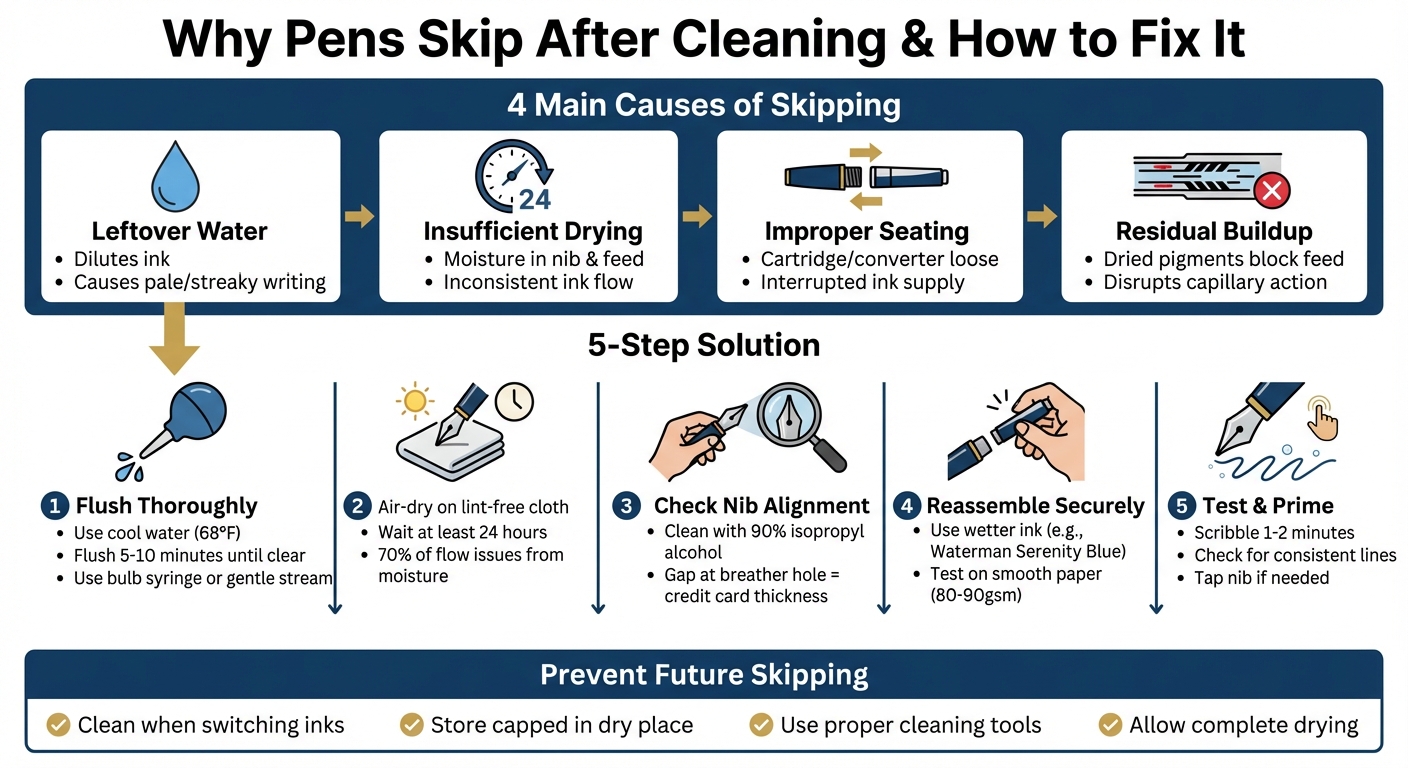
5 Steps to Fix Fountain Pen Skipping After Cleaning
Skipping Fountain Pens & Troubleshooting
sbb-itb-1dd4fe9
Why Fountain Pens Skip After Cleaning
Getting to the root of why a fountain pen skips after cleaning can save you from future frustrations. This issue often stems from four main factors that disrupt the pen's ink flow. Let’s break down these culprits.
Leftover Water or Cleaning Solution
Even a tiny amount of water or cleaning solution left in the feed channels can cause trouble. When fresh ink mixes with this residue, it can lead to diluted ink flow. The result? Pale writing, streaks on the page, or "hard starts" - those moments when the pen hesitates to write as the ink pushes out the leftover fluid.
Insufficient Drying of the Nib and Feed
Patience is key when drying your pen. If you rush to reassemble and refill while the nib and feed are still damp, the ink may not saturate the feed properly. This can result in inconsistent writing - smooth one moment, skipping the next. To avoid this, give your pen ample time to dry completely after cleaning.
Another common misstep involves the cartridge or converter.
Cartridge or Converter Not Seated Properly
"If a cartridge or converter isn't seated securely, you may get weak flow, skipping, or intermittent writing. Think of it as an ink supply line that's not fully committed." - Ferris Wheel Press
If the cartridge or converter isn’t securely in place, it can disrupt the ink supply, leading to a stop-and-start experience. Double-check that everything is firmly seated to keep the ink flowing smoothly.
Ink Residue or Build-Up
Even a thorough cleaning might not remove every last trace of ink. Dried pigments, shimmer particles, or stubborn residue can linger in the feed channels, blocking the capillary action that drives ink flow. As Ferris Wheel Press puts it:
"Residual ink, dried pigment, and tiny bits of shimmer can build up in the feed like a scandal in a drawing room." - Ferris Wheel Press
Additionally, oils from your hands can transfer to the nib during cleaning, creating an invisible barrier that interferes with ink flow. Recognizing these potential issues is the first step toward keeping your pen writing smoothly.
How to Fix Skipping Issues
If your pen is skipping, don't worry - there are steps you can take to get it writing smoothly again. Here's a guide to restoring consistent ink flow.
Flush and Dry Completely
Start by taking apart your pen and removing the cartridge or converter. Use cool water (around 68°F) to flush the nib and feed. You can do this with a bulb syringe or by holding the nib under a gentle stream of water for 5–10 minutes until the water runs clear. Avoid using hot water, as it can damage the feed and trap moisture. Once flushed, disassemble the nib and feed if possible, and lay all parts on a lint-free cloth or paper towel in a well-ventilated area. Let them air-dry for at least 24 hours. Skipping is often caused by leftover moisture, so patience here is key - rushing this step can lead to 70% of ink flow issues.
Once everything is completely dry, move on to checking the nib alignment.
Check and Align the Nib Tines
Using a 10x magnifying loupe and good lighting, inspect the nib for any misalignment. Look for tines that are too tight, spread apart, or have a flat spot at the tip (commonly called "baby's bottom"). Clean the tines with a microfiber cloth dampened with 90% isopropyl alcohol. If the tines are too tight, you can use a brass shim or your thumbnail to carefully spread them. Insert the shim between the tines and slide it back and forth 5–10 times, checking the gap width as you go. At the breather hole, aim for a gap roughly the thickness of a credit card. After each adjustment, test the pen's ink flow on paper to see if the issue improves.
Reassemble and Test Ink Flow
Once the nib and feed are cleaned and aligned, it's time to put your pen back together. Reinsert the cartridge or converter securely until it clicks into place. Use a wetter ink, such as Waterman Serenity Blue, which has lower surface tension and promotes smoother writing. Test the pen on smooth, non-absorbent paper like Rhodia dotPad (80gsm) or Clairefontaine Triomphe (90gsm). Scribble for 1–2 minutes to prime the feed. If the pen still skips, try tapping the nib on paper or gently shaking the pen upside down to get the ink flowing. A properly functioning pen should produce consistent lines without gaps or railroading.
Fix Over-Polished Nibs or Spread Tines
If your pen's nib has been over-polished, it may have a "baby's bottom", where the slit doesn't extend to the tipping material. Under a loupe, this flaw will show ink failing to reach the edges of the paper. Spread tines, on the other hand, create too wide a gap (over 0.5mm at the breather hole), leading to dry writing. To address these issues, you can lightly sand the nib's tip with 1–3 micron diamond lapping film in circular motions. However, DIY repairs come with risks, especially for lower-end steel nibs. If alignment or sanding attempts fail after two tries - or if you're dealing with a gold nib (14k or higher) - consider professional help. Services like Custom Nib Studio charge $30–60 for tuning, while Fountain Pen Revolution offers replacement nibs for $5–15 if repairs aren't cost-effective.
How to Prevent Skipping After Cleaning
Taking care of your pen regularly is the key to avoiding skipping issues after cleaning. A few simple steps can go a long way in keeping your pen writing smoothly.
Use Cleaning Kits Regularly
Make it a habit to clean your pen every time you switch inks, especially if you’ve been using shimmer or highly saturated inks. Leftover ink and pigments can build up quickly and lead to skipping if not addressed. Regular maintenance prevents this problem before it starts. A basic cleaning kit - like one with a bulb syringe and a microfiber cloth - can make the process both quick and effective. Brands like Fountain Pen Revolution offer affordable cleaning tools specifically designed for fountain pens, making upkeep simple and accessible.
Proper cleaning is just one part of the equation. How you dry and store your pen also plays a big role in maintaining smooth ink flow.
Dry and Store Pens Correctly
Take your time when drying your pen. Once you’ve flushed it, place the nib, feed, and barrel on a lint-free cloth in a well-ventilated spot and let them dry completely. Re-inking a damp pen can dilute the ink, leading to pale streaks or inconsistent flow. When everything is dry, store your pen capped and in a dry place. For long-term storage, clean it thoroughly and store it without ink.
Using the right tools for flushing is also essential for keeping your pen in top shape.
Flush with the Right Tools
Flush your pen with cool water using a bulb syringe until the water runs clear. Then, gently wipe the nib to remove any skin oils. For stubborn ink residue, soak the nib section briefly before drying it completely. As Ferris Wheel Press puts it, “If you’re swapping inks, clean the pen first so you’re not mixing two personalities in one feed”. This step is crucial to avoid chemical reactions between different ink formulas, which can clog the feed and cause skipping.
Conclusion
Skipping after cleaning often results from leftover water, trapped ink residue, misaligned nib tines, or an improperly seated cartridge. The solutions are simple: flush the pen until the water runs clear, let it dry completely, secure the ink supply, and check the nib alignment. While these steps address immediate issues, consistent care is key to avoiding future problems.
To prevent skipping, clean your pen every time you switch inks - especially if you're using shimmer or heavily saturated inks. Always store your pen capped and in a dry place to protect it.
"Your pen should glide, not grumble." - Ferris Wheel Press
Taking the time for regular maintenance ensures a smooth writing experience and helps you avoid unnecessary frustration down the road. Keep your pen in good shape, and it will reward you with reliable performance.
FAQs
How can I tell if my pen is still damp inside?
To see if your pen is still damp after cleaning, gently give it a shake or tilt it slightly to check for any water movement or drips. You can also examine the nib and feed by either touching them or looking closely for any signs of moisture. For proper drying, place the pen nib-down in a cup lined with a paper towel and let it air-dry for 12–24 hours. This helps prevent problems like diluted ink or uneven ink flow.
When should I use pen flush instead of just water?
When water alone fails to clear blockages or dried ink from your fountain pen, pen flush can be a game-changer. It’s particularly useful for tackling stubborn clogs and buildup that lead to skipping or inconsistent ink flow. If flushing with water doesn’t bring your pen back to normal, try a mild ammonia-based pen flush for a deeper clean. It’s an effective way to handle persistent performance issues and get your pen writing smoothly again.
How do I know if skipping is the nib or the ink?
To figure out why your pen is skipping, start by inspecting the nib. Look for signs of misalignment, dried ink, or any debris that might be causing trouble. If the nib appears clean and properly aligned, the problem could lie with the ink itself - dried or incompatible ink can disrupt the flow.
Give the nib and feed a thorough cleaning to remove any blockages. If the skipping continues, switch to a fresh, high-quality ink. This can often improve the ink flow and solve the problem.